
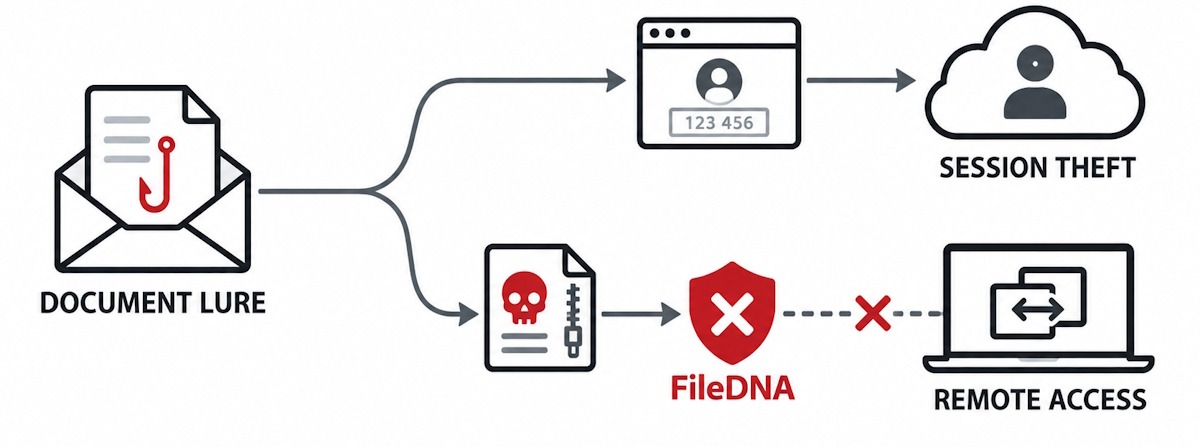
A new phishing operation called CSuite is more dangerous than ordinary credential phishing. It does not rely on a single point of failure. One path steals Microsoft 365 access through credential or device-code phishing. The other path installs legitimate remote-management software to gain lasting access to the victim’s device. Either path gives the attacker a foothold.
ANY.RUN linked the campaign to hundreds of sandbox analyses. Fifty-one percent of those submissions came from the United States. Sixty percent of the identified victim organizations were US-based. The exposed sectors include technology, manufacturing, government, consulting, education, and mortgage-related firms.
How the Campaign Operates
CSuite behaves like shared infrastructure rather than a single piece of malware. A platform supplies domains, hosting, phishing panels, remote desktops, delivery pages, and exfiltration tools. Individual affiliates plug into this platform and run their own capture endpoints.
A trusted business lure opens the chain
Victims receive what looks like an Adobe Document Cloud invitation. Others see messages impersonating DocuSign, Zoom, Google Meet, Dropbox, SharePoint, or a Microsoft voicemail alert. Some of these invitations come from accounts the attacker already controls.
A redirect gate filters each visitor
The first site fingerprints the visitor. It runs anti-bot checks. It weighs the visitor’s geography and email provider. Based on those signals, it chooses an attack path. Microsoft users get steered toward Microsoft 365 phishing. Google users get a different route. Everyone else lands on a generic credential harvester.
A counterfeit document viewer builds pressure
The destination page mimics Adobe Reader, DocuSign, SharePoint, Dropbox, or a meeting interface. Some versions quietly report the visitor’s IP address, location, browser, operating system, and screen details back to the attacker through Telegram. The fake document appears stuck loading. The page then pressures the visitor to download an update or verify their access to move forward.
Two compromise paths open from here
On the endpoint path, the page delivers an archive, an MSI installer, an executable, a BAT file, or a VBS script. On the identity path, the victim enters credentials or completes a device-code authorization that the attacker initiated.
Remote-access software gets installed
The endpoint path has delivered ScreenConnect, Action1, Atera, Syncro, PDQ Connect, Hexnode, and other legitimate administration tools. The files are renamed to look like Adobe, DocuSign, Zoom, financial statements, or routine business documents.
Sessions and mailboxes get captured
The identity path can hand the attacker working access and refresh tokens. In the device-code version, the victim genuinely signs in on Microsoft’s real website. But the session they authorize was started by the attacker, not by them.
Why Ordinary Reputation Checks Struggle
Many of the components CSuite delivers are legitimate, properly signed administrative products. The malicious element usually is not the program’s code. It is the attacker-controlled tenant, configuration, relay, and reason the software was installed in the first place.
CSuite also routes through compromised websites, Cloudflare infrastructure, public code repositories, object storage, and recognizable software publishers. Each stage can look legitimate on its own. The invitation may come from a real cloud service. The RMM installer may carry a valid signature. The authentication page may genuinely belong to Microsoft. The remote-access software may be a tool IT departments already trust. The malicious pattern only becomes visible once the stages are correlated.
Microsoft separately documented closely related phishing-to-RMM tradecraft. In that case, a disguised but properly signed MSP360 installer established the initial foothold. It then silently installed ScreenConnect through PowerShell and msiexec. Microsoft did not report any exploitation of flaws in the RMM products themselves. The attackers simply abused the administrative capabilities those tools were built to provide.
Where FileDNA Can Break the Chain
FileDNA’s strongest role sits in the file-delivery branch of CSuite, the point where a download still has to be opened before any damage happens.
Inspect misleading downloads by their actual format
A file presented as a PDF reader, a financial statement, a DocuSign component, or a Zoom update should be judged by its true structure, not by its filename or icon. FileDNA can identify archives disguised as business documents, HTML files carrying scripts and external actions, BAT, VBS, PowerShell, and JavaScript droppers, unexpected executable or installer content, nested objects and payloads inside archives, and mismatches between a file’s extension and its real format. CSuite specifically used short BAT and VBS droppers that elevated privileges, launched PowerShell, and passed remote installer URLs to msiexec. Those scripts are a high-value point to intercept the attack before any RMM agent gets installed.
Unpack archives before users can run their contents
CSuite delivered archives with names like AdobePdf_Reader.zip and Q4_Report062.zip. FileDNA can unpack the container, enumerate what is inside, identify the real file types, and expose the installer or executable before a user ever extracts and runs it. This step matters because the archive itself often looks harmless. The risk only becomes visible once its internal structure and delivery chain are examined.
Reconstruct weaponized documents and HTML attachments
Where the lure arrives as a document or an HTML attachment, CADR can remove or constrain active content, scripts, automatic actions, embedded objects, and unnecessary external references, while preserving the legitimate business information inside. This lowers the chance that a document launches the browser on its own, redirects the user, fetches another stage, or displays active content that imitates a trusted service.
Enforce policy even when the payload is signed
A valid digital signature tells you who signed a file. It does not tell you whether that file belongs in a given workflow. A FileDNA policy could require that external email cannot deliver BAT, VBS, PowerShell, MSI, or executable content, that archives containing installers get quarantined, that RMM software is only accepted through approved deployment channels, that files claiming to be documents but resolving to another format get blocked, and that unexpected active content is stripped out during reconstruction. Because FileDNA’s present scope does not reconstruct MSI or EXE installers, those files should be blocked, quarantined, or routed to a sandbox and endpoint controls, rather than sanitized and passed through.
Practical Defensive Architecture
The strongest response pairs FileDNA with several other controls working together. Phishing-resistant authentication and Conditional Access reduce the value of stolen credentials. Restrictions on device-code authentication close off one of CSuite’s identity paths directly. Approved-RMM allowlisting by product, tenant, and deployment channel limits which remote-access tools can run at all. Application Control or AppLocker policies stop unapproved executables from launching. EDR monitoring for PowerShell activity, msiexec, new services, and RMM installation catches the moment an agent tries to take hold. Web filtering and browser isolation reduce exposure to the redirect and landing-page stages. Session and refresh-token revocation cuts off access quickly once a compromise is found. Monitoring for mailbox rules, forwarding, and unusual sign-ins catches identity-path compromises that credential controls alone might miss.
The lesson from CSuite is not that every phishing attack is a file attack. It is that one of CSuite’s most damaging paths still depends on persuading a victim to download and execute a file. That path can be interrupted before a legitimate administration tool becomes an attacker’s persistent backdoor.
References: The Hacker News, ANY.RUN investigation, and Microsoft Security research.