
A familiar email design can hide a dangerous download. A trusted Windows program can load a malicious file. A normal cloud service can carry stolen data. UAT-11587 brings these tricks together in one attack chain.
Cisco Talos uncovered this China-nexus espionage campaign. It targets government and policy organizations across Asia. Talos reported about 350 compromised computers across eight countries. These include Taiwan, India, the Philippines, Cambodia, Pakistan, Thailand, Myanmar, and Syria.
The institution count needs care. Talos identified 10 confirmed affected environments, five probable ones, and one intended target. That adds up to 16 affected or targeted environments. It does not mean all 16 suffered a confirmed compromise.
Talos assesses that the campaign seeks intelligence. The evidence points to information collection and lasting access. Financial theft is not the established purpose of this activity set.
The attackers deliver a Windows backdoor called Antino. It is written in Rust. The delivery chain matters as much as the final malware. Each step helps the next one appear less suspicious.
A Fake Attachment Starts the Chain
The attack begins with a convincing email. The sender looks familiar. The subject fits the recipient’s work. The message offers a document the recipient might expect to receive.
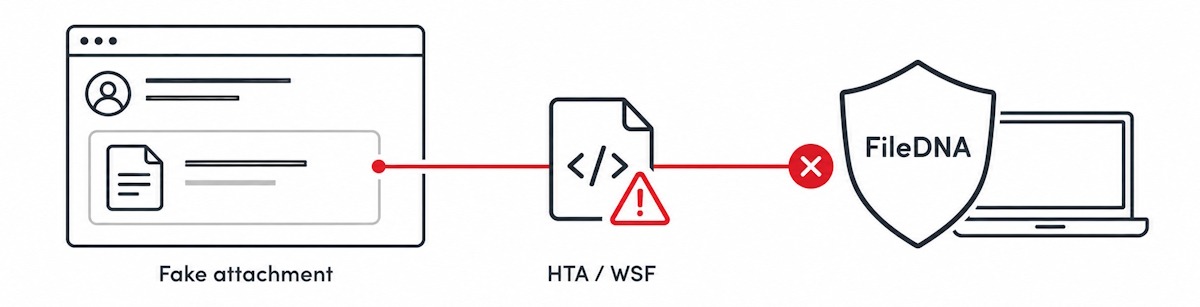
The email contains a fake Gmail attachment preview. It looks like a file card inside the message. But it is a linked image layout. The card does not represent a real document attachment.
Clicking the card takes the user to an attacker-controlled download page. The page delivers a new file. This creates a gap between what the user expects and what the browser receives.
The user expects a report or meeting document. The downloaded file is a script that can start the infection.
This is a visual deception. It does not establish that Gmail itself was compromised. The attackers copy a familiar interface to gain the user’s trust.
That distinction matters for email security. An attachment scanner cannot inspect a payload that is absent from the message. The linked download needs its own inspection point.
A Familiar Sender Adds Credibility
The attackers also spoof trusted senders. Email has more than one sender field. One is used during technical delivery. Another is the From address the recipient sees.
These fields can name different domains. A message may pass one authentication check without proving that the visible sender is genuine.
In the reviewed message, SPF passed for the delivery domain. DMARC failed because the sender domains did not align. The impersonated domain used a monitoring-only policy. The message still reached the inbox.
This shows why an SPF pass alone is not enough. Organizations need to check whether authentication matches the visible sender. They also need to enforce their email policies.
DMARC enforcement can reduce direct domain spoofing. It does not remove every phishing route. Attackers can still use lookalike domains or compromised accounts. File inspection remains useful even when email authentication improves.
The Lures Match the Target’s Work
The messages focus on topics that matter to the recipients. Examples include a Taiwan information warfare workshop, tax rules, Indo-Pacific policy, maritime issues, and diplomatic events.
These subjects help the email feel routine. The recipient does not need to be curious about a strange offer. The message can appear to belong to an existing work task.
This is the strength of targeted phishing. The attacker gives the user a plausible reason to act. Familiar subject matter can lower suspicion before the download begins.
A useful training message is simple. A relevant topic does not prove a file is safe. Neither does a familiar attachment icon.
Five Stages Lead to Antino
Stage One: A Script Opens the Door
The first download is an HTA or WSF file. HTA means HTML Application. WSF means Windows Script File. Both can carry executable script content.
On a system that allows these formats to run, opening the file can start code through a Windows script host. Downloading the file alone does not necessarily infect the computer. Execution is the critical step.
The first stage hides its window. It contacts the attacker’s infrastructure. It then retrieves the next script.
At this point, the attack still depends on a file entering the environment and being allowed to run. That makes the initial download a strong place to enforce policy.
Stage Two: The Script Prepares More Code
The second stage uses JScript. It downloads encrypted resources. It decrypts the next code in memory.
The decrypted code is not saved as an ordinary file. This reduces what a scanner can find on the hard drive.
It does not make the attack invisible. Script execution, network requests, and process behavior can still leave evidence. Security tools need to watch those events as well as stored files.
Stage Three: .NET Loads Code in Memory
The next step abuses unsafe .NET deserialization. Deserialization turns stored data back into software objects. Here, attacker-controlled data causes code to run during that process.
The chain loads TestAssembly.dll into memory. It does not write the assembly to disk as a normal DLL first.
The important point is the change in visibility. A file-based scan alone may miss code that exists only inside a running process. Endpoint monitoring must cover that behavior.
Stage Four: A Decoy Distracts the User
TestAssembly.dll opens a document, usually a PDF. The document matches the email’s story. The victim sees something expected.
At the same time, the loader downloads more files. It places them in a staging folder. Unusual extensions help hide their true purpose.
A harmless-looking PDF does not prove that the earlier download was safe. The PDF may simply distract the user while the malicious work continues.
File names also offer little assurance. A file can contain executable code even when its extension looks unfamiliar or harmless. Inspection should identify the actual content.
Stage Five: A Signed Program Loads the Backdoor
The attackers launch GatherOsState.exe. This is a legitimate Microsoft-signed tool.
The tool loads a nearby file named slc.dll. In this attack, that DLL contains Antino. This technique is called DLL side-loading.
The signed executable provides a trusted host. Its signature does not make the nearby DLL trustworthy. Defenders need to examine what the program loads and where those files came from.
This is another trust gap. The user trusts the email’s appearance. Windows recognizes the signed program. Neither fact establishes that the full chain is safe.
Antino Uses Microsoft 365 for Control
Once running, Antino uses Microsoft Graph. This is the API that many legitimate Microsoft 365 applications use.
The newer generation authenticates through an OAuth application flow. It does not require an interactive user login for each connection.
Antino sends heartbeat files to OneDrive every minute. These files tell the operator that the infected computer is still available.
It checks an Outlook mailbox every ten seconds. Special email subjects identify commands and responses. Email and file objects carry the instructions and results.
Talos describes these resources as belonging to the threat actor. Their use does not, by itself, prove that the victim’s Microsoft 365 account was compromised.
The cloud service acts as an exchange point. The attacker leaves instructions. The backdoor retrieves them. The backdoor then leaves results for the attacker.
This traffic can blend into normal cloud use. A connection to Microsoft does not explain why a process made it. The process, timing, and purpose still matter.
The Backdoor Can Extend the Intrusion
Antino can gather system information, run commands, transfer files, and establish persistence. Some builds can also load more code in memory. Capabilities vary by build.
These functions give the operator room to act after the first infection. Access can support further collection and additional tooling.
For responders, removing the initial download is therefore insufficient. They need to determine whether the backdoor ran. They also need to investigate what happened afterward.
The first file explains entry. Later activity explains impact. A sound investigation needs both.
Where FileDNA’s Content Security Layer Fits
FileDNA is positioned as a Content Security Layer, or CSL. Its core engine uses Content Analysis, Disarm, and Reconstruction, or CADR.
The most direct opportunity in this chain is the first script download. A policy can reject external HTA and WSF files before users execute them. FileDNA’s role depends on where it is integrated and which controls are enabled.
The inspection point must cover the actual delivery route. Scanning email attachments alone would leave this linked download outside the control. A browser download path, web gateway, or endpoint file workflow could provide the needed enforcement point.
Content analysis should determine what the file really is. The visible card, file name, and extension should not decide whether it is safe.
For a script whose purpose is to launch the attack, blocking or quarantine is the practical response. There may be no useful business document to preserve through reconstruction.
Organizations should check their workflows before imposing a broad ban. Some administrative tools may use script formats. Approved uses can receive narrow exceptions. External delivery should remain tightly controlled.
The protection claim also needs a clear limit. If inspection blocks this initial script before execution, it can interrupt this delivery branch. That does not prove coverage of every delivery method used by the group.
The Decoy PDF Has a Different Role
The stage-four PDF appears after malicious code has already run. Reconstructing that PDF would not reverse the infection. It would not remove Antino or undo earlier execution.
PDF reconstruction still has a useful role in document delivery. Where a PDF contains supported active features, CADR can remove those features under policy. The readable content can remain available.
That applies when the PDF itself carries dangerous content. A decoy PDF can be ordinary and harmless. Its presence does not make reconstruction the main defense against this chain.
The key question is which object starts execution. In this delivery branch, the first script is the critical object. The later PDF supports the deception.
Watch the Behavior Behind the Trusted Names
The campaign shows why familiar names deserve context. Gmail’s appearance helps sell the lure. A Microsoft signature helps host the backdoor. Microsoft 365 helps carry its communications.
None of these services needs to be malicious for the attack to work. The attacker abuses how people and tools interpret trust.
Useful defensive checks follow that behavior. Watch for script hosts launched from user downloads. Investigate signed tools running from unexpected folders. Examine DLLs loaded from those same folders.
Cloud monitoring should also consider which process is connecting. Repeated Microsoft Graph requests from an unusual executable deserve investigation. Network destination alone is too weak a reason to allow or ignore activity.
These are defensive recommendations. Their effectiveness depends on the organization’s logging, endpoint controls, and visibility into cloud traffic.
A Layered Response Covers More of the Chain
Email authentication helps reduce sender spoofing. Link inspection can identify dangerous download routes. File policy can block script delivery. Endpoint controls can detect execution that gets through.
FileDNA can strengthen the file boundary when it is placed in that path. Endpoint tools cover later activity such as in-memory loading and DLL sideloading. Cloud and network monitoring help investigate the backdoor’s communications.
If compromise is suspected, isolate the affected endpoint. Preserve useful evidence. Investigate persistence and file transfers. Review related messages and downloads to find other exposed users.
The strongest prevention point is early. Stop the dangerous file before it runs. Keep later controls ready for the cases where delivery or execution escapes that first layer.
UAT-11587 makes a malicious download look like routine work. The defense must follow the file beyond its appearance. It must check what arrives, what runs, and what that process does next.